

Getting internet set up used to mean blocking off half a day, waiting for a technician, and hoping they showed up somewhere within a vague four-hour window. Now, with Spectrum net selfinstall, you can skip all that. The idea sounds simple: they send you a kit, you plug things in, and you’re online.
Simple… but not always effortless.
If you’ve ever stared at a blinking modem light wondering what went wrong, you know what I mean. Let’s walk through what Spectrum’s self-install process is actually like, where people get stuck, and how to make it smooth the first time.
So, what does “self-install” actually mean?
At its core, Spectrum net selfinstall just means you’re setting up your own internet equipment instead of having a technician do it for you.
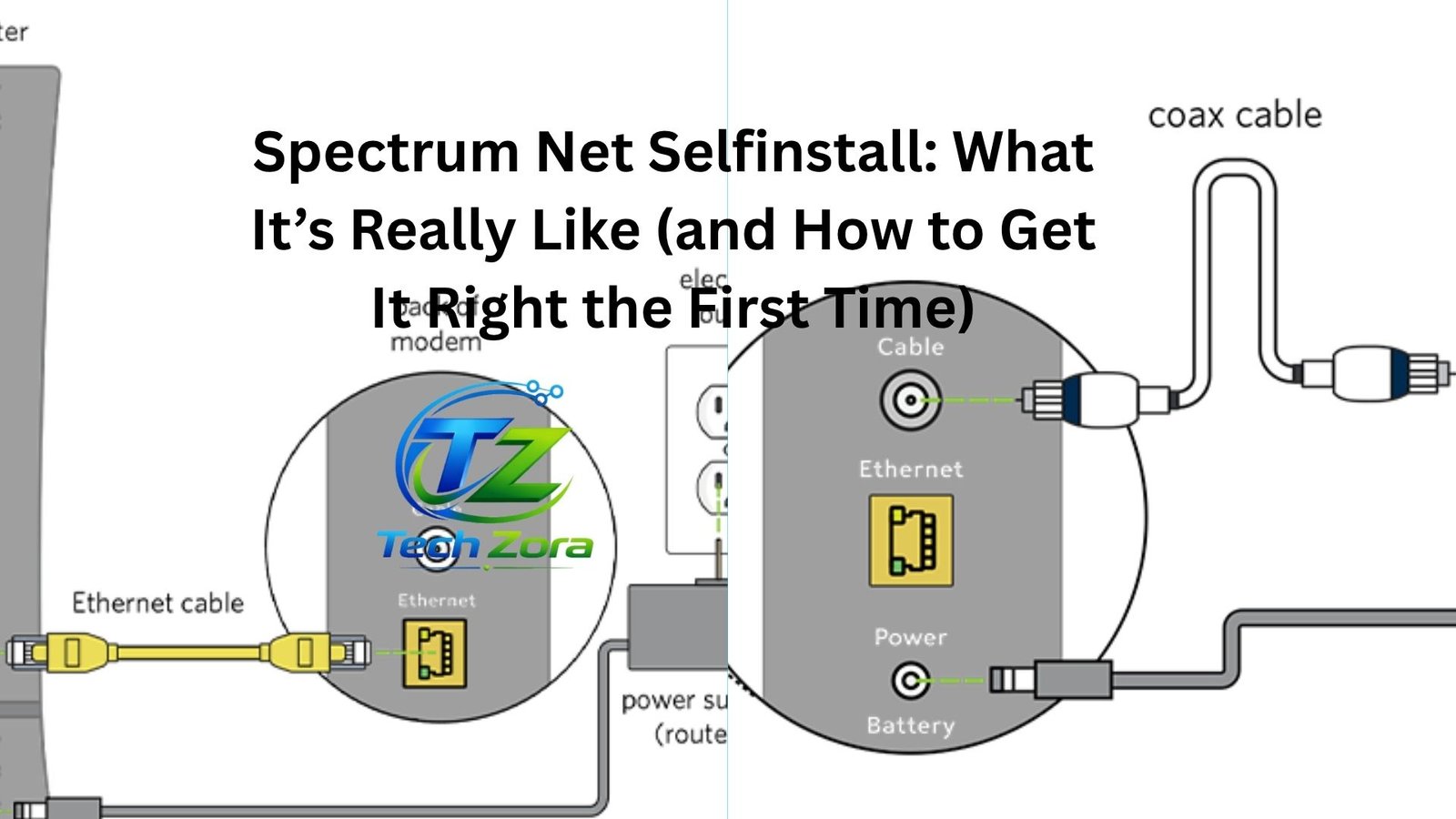
They ship you a kit that usually includes:
- A modem
- A router (if you’re renting one)
- Coaxial cable
- Ethernet cable
- Power adapters
- A quick-start guide
You connect everything, activate the service, and that’s it.
Well, that’s the theory.
In reality, whether it’s easy or mildly frustrating depends on one big factor: how ready your home already is.
If the previous tenant had Spectrum and left the wiring intact, you’re probably in for a quick 15–20 minute setup. If not, things can get a little more interesting.
The moment the box arrives
There’s always a small moment of optimism when you open the box. Everything looks clean, labeled, and manageable. No complicated tools. No drilling. Just cables.
That’s a good sign.
Most people start by choosing where to place the modem and router. This matters more than people think. Stick it in a corner behind a couch, and your Wi-Fi will act like it’s hiding too.
A better approach? Somewhere central. Elevated if possible. Not right next to thick walls or metal objects.
A small decision, but it makes a big difference later.
Plugging it all in (where things can go sideways)
Here’s the part where confidence meets reality.
You’ll connect the coax cable from the wall outlet to the modem. Then power up the modem. Then connect the router (if it’s separate). Then wait.
And wait.
This is where people start second-guessing everything. The lights blink. Then change. Then blink again.
Let’s be honest: modem lights feel like they’re speaking a secret language.
Usually, you’re looking for a steady “online” or “internet” light. That can take anywhere from a couple of minutes to ten.
If it connects smoothly, great. You’re ahead of the game.
If it doesn’t, don’t panic yet. A lot of issues at this stage are surprisingly simple:
- The coax cable isn’t fully tightened
- The wall outlet isn’t active
- The modem hasn’t been activated yet
That last one trips people up all the time.
Activation is the quiet step people forget
Even if everything is plugged in perfectly, your internet won’t work until Spectrum activates the service.
Sometimes this happens automatically. Sometimes you need to do it yourself through their app or a browser page.
A typical scenario: everything looks connected, your Wi-Fi network appears, but there’s no internet. You open a webpage and get redirected to an activation screen.
Follow it. It usually takes just a few minutes.
If you skip this step—or don’t realize it’s required—you’ll end up troubleshooting a problem that isn’t really a problem.
When things don’t go smoothly
Here’s the thing: self-install works great when the infrastructure is already in place. When it isn’t, it can feel like you’re missing a piece of the puzzle.
A few common situations:
The outlet isn’t active
You plug in the coax cable, but the modem never fully connects. The “online” light just keeps blinking.
This often means the cable line in your home hasn’t been activated or connected outside. No amount of unplugging and replugging will fix that.
At that point, you’ll need a technician visit anyway.
Old or damaged wiring
Sometimes the wiring exists, but it’s not in good shape. Maybe it’s been split too many times. Maybe it’s just old.
The result? Slow speeds, unstable connection, or no connection at all.
This is one of those cases where self-install technically works… but doesn’t work well.
Router confusion
Another common hiccup: people mix up modem and router connections. Or they connect to Wi-Fi but don’t realize the router isn’t fully set up.
A quick check: if your device connects to Wi-Fi but says “No Internet,” the issue is usually between the modem and Spectrum, not your device.
The app makes a difference
Spectrum’s app does more heavy lifting than you might expect.
It walks you through activation, shows connection status, and even helps name your Wi-Fi network.
It’s also where you’ll end up if something goes wrong.
Let’s say your modem won’t connect. The app might tell you directly: “We’re having trouble detecting your device,” which is a lot more helpful than guessing based on blinking lights.
If you’re doing a self-install, the app isn’t optional. It’s part of the process.
Speed expectations vs reality
This is where expectations need a small adjustment.
Getting connected is one thing. Getting the speed you’re paying for is another.
Right after setup, people often run a speed test and get mixed results. Sometimes it’s great. Sometimes it’s… not.
A few reasons:
- The router placement isn’t ideal
- Too many devices are connected
- You’re testing over Wi-Fi instead of Ethernet
- The network is still stabilizing
A quick real-world example: someone sets up their router in a closet because it’s “out of the way,” then wonders why their bedroom connection is weak. Move the router into the open, and suddenly everything improves.
It’s not always the service—it’s the setup.
Is self-install actually worth it?
Short answer: yes, most of the time.
You avoid installation fees, scheduling headaches, and waiting around. For a lot of people, that alone makes it worthwhile.
But it’s not for everyone.
If you’re not comfortable troubleshooting basic connection issues, or if your home hasn’t had Spectrum before, a technician visit might save you time and frustration.
There’s also a middle ground. You can try self-install first. If it doesn’t work, Spectrum will usually send someone out anyway.
So the risk is fairly low.
Small things that make a big difference
This is the part people don’t always talk about.
Success with Spectrum net selfinstall often comes down to a few small choices:
Take an extra minute to tighten every cable properly. Loose connections are more common than you’d think.
Place the router somewhere open, not hidden. Wi-Fi needs space.
Restart everything once after setup. It sounds basic, but it can clear up weird connection issues.
Use the app instead of guessing. It’s faster and more accurate.
And maybe the biggest one: give it a little time. Not everything works instantly, even when it’s set up correctly.
When to stop troubleshooting and call it
There’s a point where continuing to tinker just wastes your time.
If you’ve:
- Checked all connections
- Tried activation
- Restarted the equipment
- Waited a reasonable amount of time
…and it still doesn’t work, it’s probably not something you can fix from inside your home.
That’s when it makes sense to call Spectrum and schedule a technician.
No need to wrestle with it for hours.
The overall experience, honestly
Spectrum net selfinstall sits in that middle ground between “super easy” and “mildly annoying.”
For some people, it’s a quick plug-and-play win. For others, it’s a short troubleshooting session followed by a support call.
But it’s rarely a disaster.
The process has improved a lot over the years. The instructions are clearer. The app helps. The equipment is more user-friendly.
And once it’s working, it just fades into the background—which is exactly what you want from internet service.
Final thoughts
If you’re reasonably comfortable plugging in cables and following a few on-screen steps, Spectrum net selfinstall is worth trying.
It saves time. It gives you control. And in many cases, it just works.
The key is going in with realistic expectations. It might be quick. It might take a bit of troubleshooting. Either way, you’re not stuck.
Set it up carefully, don’t rush the process, and pay attention to the small details. That’s usually the difference between a smooth install and an unnecessarily frustrating one.
And once it’s done, you’ll forget the setup ever happened—which is probably the best outcome you can hope for.











Leave a Reply